Home · Fix Sombody · Broken
Click and drag to rotate
Fix Sombody
Broken
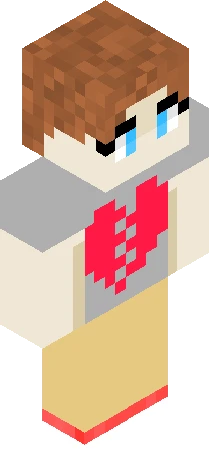
You make me feel like a stranger, can't see myself in the mirror, after all you wanted me to change, I'm the problem that's what you call me, so you can say that, that you solved me, when it falls apart I take the blame, that's how I know, you just want to fix somebody It ain't really hard to tell It's written on your face you want me, want me to be someone else, yeah you always say that I need saving but I don't need your help, so if you wanna fix somebody Maybe you should fix yourself, fix yourself. This skin is inspired by the song Fix Somebody by New Rule
64×64 · classic or slim is detected from the PNG
Eaglercraft · Minecraft
Utiliser ce skin dans Eaglercraft
Télécharge le PNG, puis applique-le dans le client Eaglercraft que tu utilises déjà. Les menus varient selon l’hébergeur. Ce site ne distribue pas le jeu.
- 1Download the PNG with the button above.
- 2Open your Eaglercraft 1.8 client in the browser.
- 3On the title screen, open Options, then the skin control. It is often named Skin or Change Skin.
- 4Upload this PNG, or paste a direct image link if that menu asks for a URL.
- 5Join a world. The skin stays in this browser for that client.
Standard model · 64×64. Nous ne demandons jamais de mot de passe de jeu. Un fichier de skin n’est que de l’illustration.
Utiliser ce skin dans Minecraft
- 1Download the same PNG.
- 2In the Minecraft Launcher, open Skins and choose a new skin.
- 3Pick classic or slim so the arms match this skin, then upload the file.
- 4Bedrock can use this artwork where that device lets you import a custom skin PNG. The file itself is the standard Java skin layout.
Similar skins