Home · Dazzles03 · -- ascendancy ; ce
Click and drag to rotate
Dazzles03
-- ascendancy ; ce
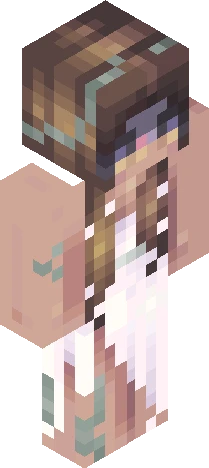
[show more] [Contest] - https://www.minecraftskins.com/skin/24249502/-/ [Host] - https://www.minecraftskins.com/profile/5866822/dazzles03 [Major Inspo / Reference] - https://www.minecraftskins.com/skin/20673770/-/ not feeling super confident about this skin the design is really similar to a lot of the other entries for this contest :p I’m content with the shading though I was going for a mix of ancient greco-roman styling and modern Mediterranean fashion, with a small nod to the olives grown in this region with the eye color [au revoir] armor ; bracelets ; braids ; brown ; brunette ; crop top ; crown ; dress ; earrings ; gauntlet ; girl ; glove ; goddess ; gold ; golden ; green ; headpiece ; laurel ; leg band ; mediterranean ; necklace ; shine ; shiny ; tiara ; white ; yellow
64×64 · classic or slim is detected from the PNG
Eaglercraft · Minecraft
Bu skini Eaglercraft’ta kullan
PNG’yi indir, sonra hâlihazırda kullandığın Eaglercraft istemcisinde uygula. Menüler siteye göre değişir. Bu site oyunu dağıtmaz.
- 1Download the PNG with the button above.
- 2Open your Eaglercraft 1.8 client in the browser.
- 3On the title screen, open Options, then the skin control. It is often named Skin or Change Skin.
- 4Upload this PNG, or paste a direct image link if that menu asks for a URL.
- 5Join a world. The skin stays in this browser for that client.
Standard model · 64×64. Oyun şifresi istemeyiz. Bir skin dosyası yalnızca görseldir.
Bu skini Minecraft’ta kullan
- 1Download the same PNG.
- 2In the Minecraft Launcher, open Skins and choose a new skin.
- 3Pick classic or slim so the arms match this skin, then upload the file.
- 4Bedrock can use this artwork where that device lets you import a custom skin PNG. The file itself is the standard Java skin layout.
Similar skins