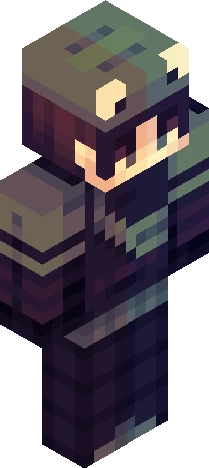
Home · Baseball Cap · | G r y f f i n |
Click and drag to rotate
Baseball Cap
| G r y f f i n |
Heyo! Saw a cute outfit on Pinterest (again) and wanted to recreate it! had a lot of fun experimenting with new shading techniques to improve my style :) Credits: Didn't directly use anyone's skins, but I used these skins as references for my shading study Outlandishhh : https://www.minecraftskins.com/skin/24246188/yes-man---rce/ judooooo : https://www.minecraftskins.com/skin/24350958/chocolate/ tallymarks : https://www.minecraftskins.com/skin/23959099/froggy/ I may be forgetting some, so if you feel I copied and you want credit, please please please lmk!
64×64 · classic or slim is detected from the PNG
Eaglercraft · Minecraft
Как использовать этот скин в Eaglercraft
Скачайте PNG и примените его в клиенте Eaglercraft, которым вы уже пользуетесь. Меню зависят от сайта. Этот сайт не распространяет игру.
- 1Download the PNG with the button above.
- 2Open your Eaglercraft 1.8 client in the browser.
- 3On the title screen, open Options, then the skin control. It is often named Skin or Change Skin.
- 4Upload this PNG, or paste a direct image link if that menu asks for a URL.
- 5Join a world. The skin stays in this browser for that client.
Standard model · 64×64. Мы никогда не просим пароль от игры. Файл скина — только картинка.
Использовать этот скин в Minecraft
- 1Download the same PNG.
- 2In the Minecraft Launcher, open Skins and choose a new skin.
- 3Pick classic or slim so the arms match this skin, then upload the file.
- 4Bedrock can use this artwork where that device lets you import a custom skin PNG. The file itself is the standard Java skin layout.
Similar skins






I Think Anyone can Choose to Do Good, or be Good, No Matter what Happened Before
64×64 PNG · Java, Bedrock, Eaglercraft
Edit skin