Home · Camping · .-=!-Hiking a trail-!=-
Click and drag to rotate
Camping
.-=!-Hiking a trail-!=-
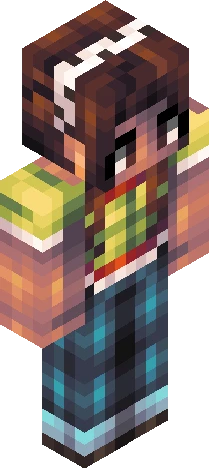
🏞️ Squish dat show more button 🏞️ Just a hiking skin I did for fun :) I also played around with the shading, lemme know what you think of it! She is wearing a teal and white-ish teal colored shirt, green cargo pants, a teal jacket tied around her waist, hiking boots with a red bit of fabric decorating them, three different multicolored bracelets, a wrist watch, a teal and white ballcap with a sunset embroidered onto it, a navy blue backpack with light pink and hot pink hearts and matching tassels on the zippers, and last but not least, her hair is in a french braid. :D I'm gonna have to get really creative with the tags now. XD
64×64 · classic or slim is detected from the PNG
Eaglercraft · Minecraft
How to use this skin in Eaglercraft
Download the PNG, then apply it in the Eaglercraft client you already use. Menus differ by host. This site does not distribute the game.
- 1Download the PNG with the button above.
- 2Open your Eaglercraft 1.8 client in the browser.
- 3On the title screen, open Options, then the skin control. It is often named Skin or Change Skin.
- 4Upload this PNG, or paste a direct image link if that menu asks for a URL.
- 5Join a world. The skin stays in this browser for that client.
Standard model · 64×64. We never ask for a game password. A skin file is only artwork.
Use this skin in Minecraft
- 1Download the same PNG.
- 2In the Minecraft Launcher, open Skins and choose a new skin.
- 3Pick classic or slim so the arms match this skin, then upload the file.
- 4Bedrock can use this artwork where that device lets you import a custom skin PNG. The file itself is the standard Java skin layout.
![Deltarune ~ Kris [ Light World ] Minecraft skin preview](https://cdn.eaglercraft.studio/skins/m24291019/preview.webp)