Click and drag to rotate
Comics
Green Lantern | John Stewart
by Goobzert · Minecraft Skins community listing
Download Green Lantern | John Stewart Minecraft skin for free. Compatible with Minecraft Java, Bedrock, and Eaglercraft. Tagged comics, dc, green, superhero. Preview it in 3D, open it in the browser-based skin editor, or save the 64×64 PNG.
Uploader notes
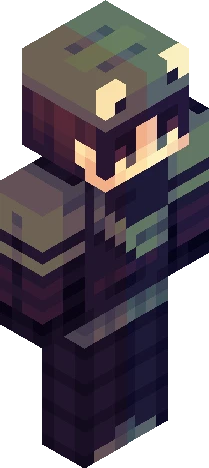
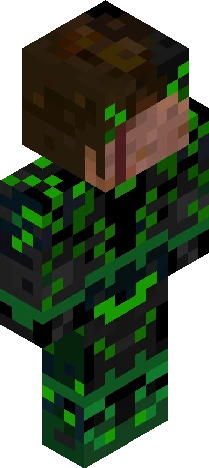
*~See more for details~* This skin is based on the comic book version of Joh Stewart in his comic book outfit as the Green Lantern! Detail: skin is wearing a black and green suit with a lantern logo on the chest. He has green boots and green around his forearms. His suit has green on the upper torso section as well as his shoulders. The black is a dark blue that helps compliment the green. He has green eyes and short black hair with a lighter tone as it goes down. Been enjoying the show and wanted to make John. Never really knew this character that much until watching Lanterns, and I think he's really cool! I've posted some renders of this skin over on my instagram if you'd like to check those out! (and maybe follow and like the post as well? :D) Instagram: goobzert.mc
64×64 · classic or slim is detected from the PNG
Added value
What’s on this skin page
Preview, categories, compatibility, and tools on this page — not a bare file mirror.
- Creator
- Goobzert
- Source
- Minecraft Skins community listing · curated on Eaglercraft Studio
- Format
- 64×64 PNG skin texture
- Model
- Classic or slim (detected from the PNG)
- Compatible with
- Eaglercraft · Minecraft Java · Bedrock (classic skin import)
- Studio tools
- 3D preview · browser editor · avatar maker
- Categories
- Comics, DC, Green, Superhero
Download
How to download this free skin
- 1Click Download skin to save the free PNG.
- 2Follow Use in Eaglercraft below for client steps, or import the file in Minecraft Java (Profile → Skins).
- 3Optional: open Avatar maker for a Discord / YouTube profile picture from the same texture.
Downloads are free. An optional account only saves favorites across devices.
Edit
How to edit this skin
- 1Open Edit skin to load this PNG in the browser editor.
- 2Paint, swap layers, or remix parts — changes stay on your device until you download.
- 3Export a new 64×64 PNG and use it in Eaglercraft or Minecraft Java.
Eaglercraft · Minecraft
이 스킨을 Eaglercraft에서 사용하기
PNG를 받은 뒤, 이미 쓰는 Eaglercraft 클라이언트에서 적용하세요. 메뉴는 사이트마다 다릅니다. 이 사이트는 게임을 배포하지 않습니다.
- 1Download the PNG with the button above.
- 2Open your Eaglercraft 1.8 client in the browser.
- 3On the title screen, open Options, then the skin control. It is often named Skin or Change Skin.
- 4Upload this PNG, or paste a direct image link if that menu asks for a URL.
- 5Join a world. The skin stays in this browser for that client.
Standard model · 64×64. 게임 비밀번호는 요청하지 않습니다. 스킨 파일은 그림일 뿐입니다.
이 스킨을 Minecraft에서 사용하기
- 1Download the same PNG.
- 2In the Minecraft Launcher, open Skins and choose a new skin.
- 3Pick classic or slim so the arms match this skin, then upload the file.
- 4Bedrock can use this artwork where that device lets you import a custom skin PNG. The file itself is the standard Java skin layout.
Similar skins
More library skins from related categories — curated for discovery, not random filler.