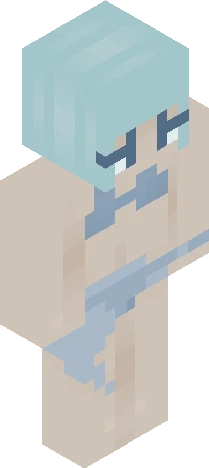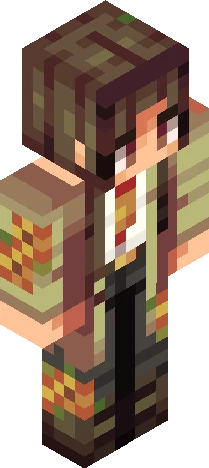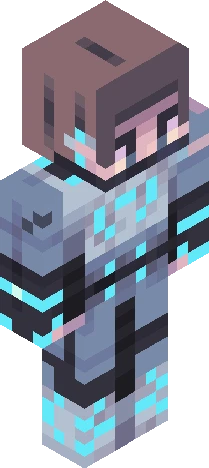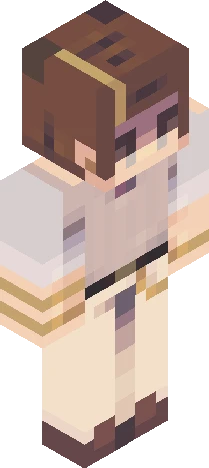
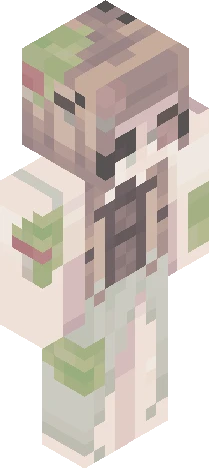
Click and drag to rotate
500ftce
-- 500 Followers: Themed Contest --
by sadlywinter · Minecraft Skins community listing
-- 500 Followers: Themed Contest -- is a free 64×64 Minecraft skin PNG in the Eaglercraft Studio library. Tagged 500ftce. Compatible with Eaglercraft and Minecraft Java — rotate the 3D viewer, edit online, or download.
Uploader notes
[show more] first of all, thanks sm for 500 followers <3 i appreciate y’all to celebrate, here’s a themed contest (with a bit of a twist for the sillies) You’ll be randomly getting two themes that you’ll have to combine into one skin; . One theme will be relatively straightforward, like an aesthetic or a style. . The other theme will be an abstract idea that you’ll have to incorporate into your design. (i.e. emotions, values, concepts, that sort of thing.) Rules; . Tell me in the comments if you’re joining so I can give you your two themes. You get 2 rerolls for each theme; just remember, you can’t go back once you use a reroll. . Please try your best to use both of your themes! I’ll be judging partially on creativity. I encourage you to explain parts of your design in the skin’s description so I can see your thought process. . Don’t use themes you aren’t assigned. . Anyone can join! (Invite not required) . Follow Skindex rules. (obviously-) . Tag it with ‘500ftce’ << . Due October 4th (extensions are allowed, just ask!) Prizes; 1st . 5 pages of likes and 2 follows 2nd . 4 pages of likes and 1 follow 3rd . 3 pages of likes HM . 1 page of likes [au revoir]
500ftceEaglercraft
64×64 · classic or slim is detected from the PNG
Added value
What’s on this skin page
Preview, categories, compatibility, and tools on this page — not a bare file mirror.
- Creator
- sadlywinter
- Source
- Minecraft Skins community listing · curated on Eaglercraft Studio
- Format
- 64×64 PNG skin texture
- Model
- Classic or slim (detected from the PNG)
- Compatible with
- Eaglercraft · Minecraft Java · Bedrock (classic skin import)
- Studio tools
- 3D preview · browser editor · avatar maker
- Categories
- 500ftce
Download
How to download this free skin
- 1Click Download skin to save the free PNG.
- 2Follow Use in Eaglercraft below for client steps, or import the file in Minecraft Java (Profile → Skins).
- 3Optional: open Avatar maker for a Discord / YouTube profile picture from the same texture.
Downloads are free. An optional account only saves favorites across devices.
Edit
How to edit this skin
- 1Open Edit skin to load this PNG in the browser editor.
- 2Paint, swap layers, or remix parts — changes stay on your device until you download.
- 3Export a new 64×64 PNG and use it in Eaglercraft or Minecraft Java.
Eaglercraft · Minecraft
이 스킨을 Eaglercraft에서 사용하기
PNG를 받은 뒤, 이미 쓰는 Eaglercraft 클라이언트에서 적용하세요. 메뉴는 사이트마다 다릅니다. 이 사이트는 게임을 배포하지 않습니다.
- 1Download the PNG with the button above.
- 2Open your Eaglercraft 1.8 client in the browser.
- 3On the title screen, open Options, then the skin control. It is often named Skin or Change Skin.
- 4Upload this PNG, or paste a direct image link if that menu asks for a URL.
- 5Join a world. The skin stays in this browser for that client.
Standard model · 64×64. 게임 비밀번호는 요청하지 않습니다. 스킨 파일은 그림일 뿐입니다.
이 스킨을 Minecraft에서 사용하기
- 1Download the same PNG.
- 2In the Minecraft Launcher, open Skins and choose a new skin.
- 3Pick classic or slim so the arms match this skin, then upload the file.
- 4Bedrock can use this artwork where that device lets you import a custom skin PNG. The file itself is the standard Java skin layout.
Similar skins
More library skins from related categories — curated for discovery, not random filler.