Home · Anime · SizArts - Dark Souls III - Commission
Click and drag to rotate
Anime
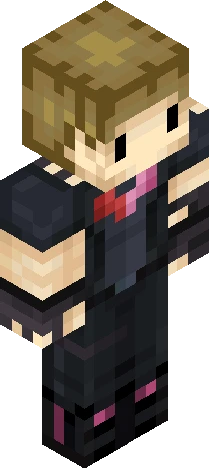
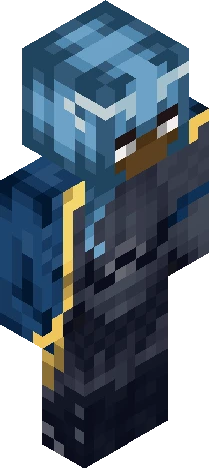
SizArts - Dark Souls III - Commission
Show More! (Please ._.) Hey! here SizArts, it's been a while huh? :D Made this skin some time ago, i think it's one of my best, what y'all think? ehehe I think i'm really good at making knights and armors :3 -+* -+* -+* Join my telegram page for downloading the full skin pack for free! https://t.me/SizArtsMC -+* -+* -+* Looking for a custom skin commission? Feel free to Dm me on -Discord; "SizArts." By adding the last "." Too! -Reddit; Theartofsiz -Instagram; SizArtsMC. -+* -+* -+* Follow my works also on; -SkinsCollection -Planet Minecraft -NameMC -SkinMC -Reddit -Instagram -+* -+* -+* See y'all to the next skin! -SizArts.
64×64 · classic or slim is detected from the PNG
Eaglercraft · Minecraft
So nutzt du diesen Skin in Eaglercraft
Lade die PNG herunter und wende sie im Eaglercraft-Client an, den du bereits nutzt. Die Menüs unterscheiden sich je nach Host. Diese Website verteilt das Spiel nicht.
- 1Download the PNG with the button above.
- 2Open your Eaglercraft 1.8 client in the browser.
- 3On the title screen, open Options, then the skin control. It is often named Skin or Change Skin.
- 4Upload this PNG, or paste a direct image link if that menu asks for a URL.
- 5Join a world. The skin stays in this browser for that client.
Standard model · 64×64. Wir fragen nie nach einem Spielpasswort. Eine Skin-Datei ist nur Grafik.
Diesen Skin in Minecraft nutzen
- 1Download the same PNG.
- 2In the Minecraft Launcher, open Skins and choose a new skin.
- 3Pick classic or slim so the arms match this skin, then upload the file.
- 4Bedrock can use this artwork where that device lets you import a custom skin PNG. The file itself is the standard Java skin layout.
Similar skins






Does Anyone Want to Play Cubecraft on Java with Me?
64×64 PNG · Java, Bedrock, Eaglercraft
Skin bearbeiten